
With the release of macOS Tahoe and iOS/iPadOS 26, Apple introduced one of the most significant innovations in mobile device management in recent years: the ability to natively migrate from one MDM to another without wiping the device or involving the end user. This feature, integrated into Apple Business Manager (ABM) and Apple School Manager (ASM), addresses a concrete need for companies looking to migrate their device management to other solutions without compromising productivity.
The new migration workflow allows you to plan and automate the transition from solutions like Workspace ONE, MobileIron/Ivanti, or other MDM systems to a new platform, such as Microsoft Intune, while maintaining complete and secure control over the process. Apple has introduced coordinated management between ABM, the operating system, and the new MDM, capable of defining the timing and status of the migration, up until enrollment on the new MDM is complete.
In this article, we’ll explore how to implement this new feature and why it might be a strategic choice for decision makers.
Overview
The new MDM migration mechanism introduced by Apple with macOS Tahoe and iOS/iPadOS 26 represents a structural evolution in the way enterprises can manage the lifecycle of their devices. It’s not simply an additional feature, but a paradigm shift in enterprise management: Apple has revolutionized the process, moving from a “disruptive” mode based on “reset and reconfigure” to a business continuity approach, minimizing the impact on users and administrators.
The new migration logic leverages operating system-level mechanisms to coordinate automatic unenrollment from the old MDM and subsequent enrollment on the new platform, preserving configurations while ensuring security, continuity, and compliance.
During the process, ABM communicates with both MDM systems to manage the device transition and set a deadline by which the migration must be completed. Users receive notifications until the established date; If the user does not manually perform this operation, the device automatically migrates, completing enrollment in the new MDM.
From a technical standpoint, Apple has introduced a significant improvement in the management of managed apps and their associated corporate data. During the migration, if the new MDM installs the same apps before sending the DeviceConfigured command, the app data and settings remain intact. This means the user will not have to manually reinstall the applications, making the process quicker and less invasive than a complete device reset.
The integration of these features relies on the Declarative Device Management (DDM) model, which moves part of the configuration and validation logic directly to the device, thus reducing its dependency on MDM server latencies.
Considering the above, some key advantages of this feature can be identified, including:
- Reduced migration times: The migration can be planned and completed without having to format the devices, eliminating manual setup and reconfiguration times.
- End-user continuity: Corporate data and managed apps remain available, ensuring a seamless and virtually imperceptible migration for device users.
- Process automation: Coordinated management between ABM and the two MDMs dramatically reduces manual intervention, reducing the risk of error.
- Greater data security: The operating system protects encryption mechanisms and automatically regenerates security keys (such as FileVault PRK) on the new MDM.
- Compatibility with corporate compliance processes: Management of Activation Lock, FileVault, and any other security profiles is guaranteed even during the transition, without loss of control.
Among the platforms compatible with the new migration process, Microsoft Intune is currently the most comprehensive solution for combining Apple device management within a unified IT ecosystem. Thanks to its integration with Microsoft 365 and Entra ID, Intune allows you to consolidate security, compliance, and productivity into a single management interface.
The key benefits of moving to Intune include:
- Unified, cross-platform management, with consistent policies and controls for Apple, Windows, and Android.
- Compatibility with Apple’s Device Management (DDM) model, enabling near-real-time configuration and reporting.
- Complete device lifecycle automation, from deployment to migration to decommissioning.
- Integration with ABM for app and license management, simplifying reinstallation and content assignment during the transition.
Requirements
The requirements to enable the new Apple feature are:
- Apple requirements*
- Devices updated to macOS 26 (Tahoe) or iOS/iPadOS 26 or later. Corporate devices enrolled through Automated Device Enrollment (ADE).
- If the devices were added through Apple Configurator, the 30-day grace period must have elapsed.
- The user must have the Administrator or Device Enrollment Manager role.
- The organization must manage the devices through an Apple Business Manager (or School Manager) configured with both MDMs involved in the migration.
- MDM requirements
- Both MDMs must support the Apple Migration APIs and Declarative Device Management (DDM).
- The new MDM must be properly enrolled in ABM as the target server and enabled for automatic enrollment.
- Presence of updated MDM certificates, server tokens, and VPP tokens.
- Support for FileVault escrow, bootstrap tokens, and automatic PRK rotation (for macOS devices).
- Pre-configuration of critical profiles (Wi-Fi, VPN, certificates) to be applied during the “Await Final Configuration” phase.
* If one or more Apple requirements are not met, it will not be possible to set a migration deadline on the Apple Business Manager portal.
MDM migration process
The process for migrating to a new MDM for devices enrolled through Apple Business Manager is very simple:
- Log in to the Apple Business Manager portal with administrative credentials.
- Go to the Devices section and select the device(s) you wish to migrate.
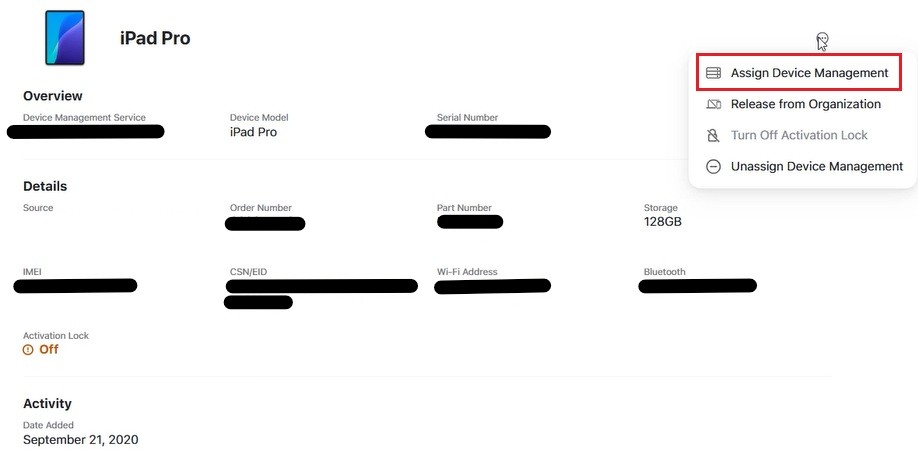
- Click the Additional Actions button in the upper-right corner of the details pane and select the Assign Device Management option.
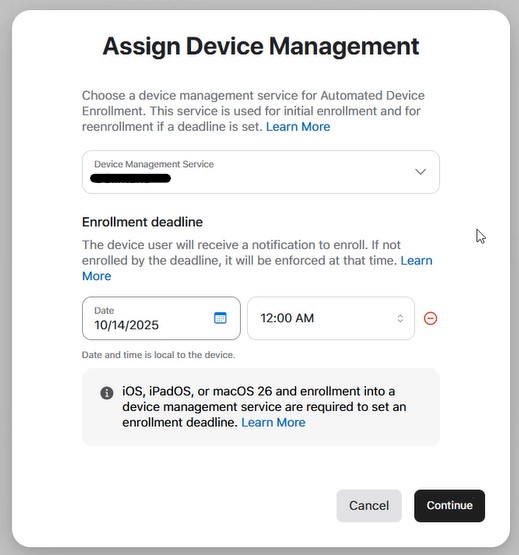
- Select the target MDM.
- If all requirements are met, you can select the Add Deadline option.
- Set the enrollment expiration date and time (this will be the date the device will force migration if the end user doesn’t take action beforehand).
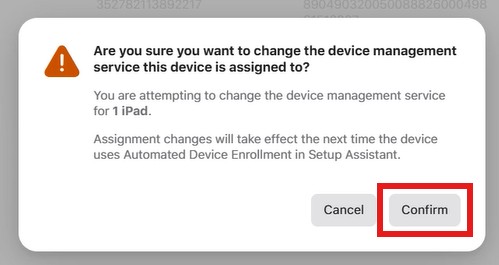
- Confirm the migration process using the appropriate confirmation button.
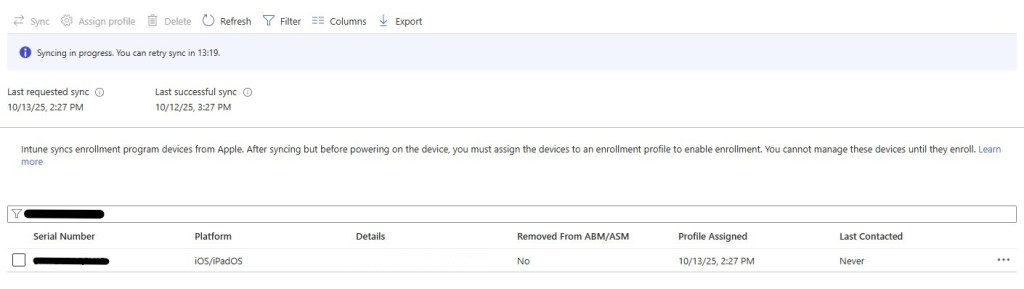
- Verify that the migration process completes successfully.


- Once the assignment activities are completed and the appropriate synchronization is complete, the device will be visible on the new MDM (in our case Microsoft Intune).
User Experience
Below are some screenshots of the user experience provided during the process of migrating an iPad device to the new MDM without having to wipe the device.
The user will be periodically prompted to notify the migration process by the scheduled date:
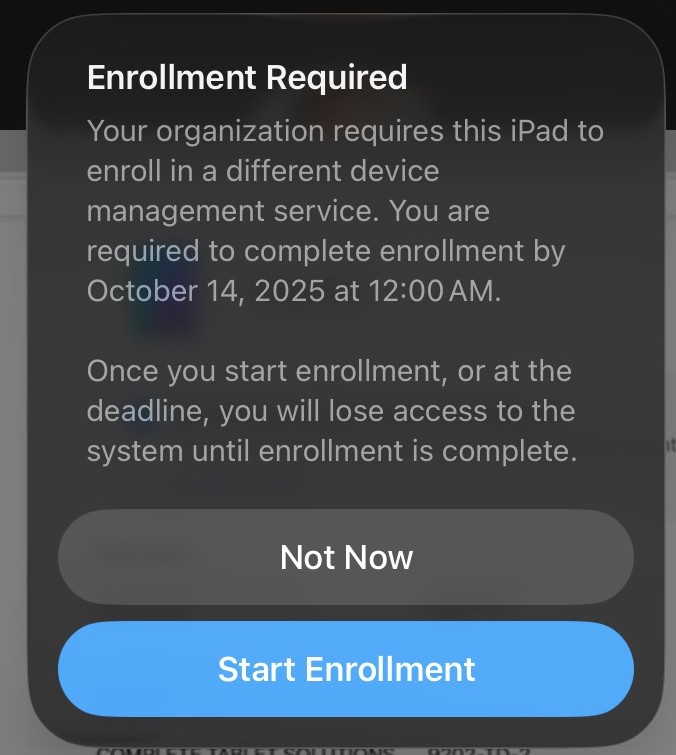
Once the procedure has been started via the Start Enrollment button, the device will carry out the appropriate configuration activities until a restart is requested.
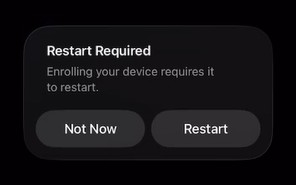
During the next startup phase, it will be possible to start enrollment on the new MDM by selecting the appropriate option and entering the appropriate company credentials.

At the end of the process, the device will be registered (in corporate mode) on the new MDM while maintaining all the user data previously present.
References
Here are some useful references to official documentation:
- Automated Device Enrolment and device management
- Migrate managed devices to another device management service
- Set up Microsoft Intune enrollment for iOS/iPadOS devices in Apple Business Manager
Conclusions
The new MDM migration feature introduced by Apple with macOS Tahoe and iOS/iPadOS 26 marks a turning point in enterprise device management. For the first time, organizations can transfer their devices between different management systems without wiping, without data loss, and with full protection of security settings.
The adoption of Microsoft Intune as the target platform completes the picture, offering an ecosystem integrated into the Microsoft 365 world. Furthermore, Intune allows you to fully leverage the potential of Cupertino’s new MDM framework, automating the enrollment phase, monitoring compliance in real time, and ensuring continuity between the Apple and Microsoft worlds.
 Enterprise Mobility Blog